antiX Review
antiX 26: Debian-Stable Lightness With a systemd-Free Heart
What if a Linux distribution could resurrect a twenty-year-old laptop and still feel quick on a modern desktop? antiX has been answering that question for years, and its latest release doubles down on the formula: Debian’s rock-solid base, featherweight window managers, and a firm stance against systemd.
antiX is a fast, lightweight and easy-to-install Linux live CD distribution based on Debian’s “Stable” branch for x86-compatible systems. It is, in fact, the sibling project that gave us our MX Linux review subject: MX Linux began as a cooperative venture between the antiX and former MEPIS Linux communities, and the two projects still share technology and spirit. Where MX aims at a mid-weight desktop, antiX goes leaner — DistroWatch files it under Old Computers, Load To RAM, Live Medium, and Desktop, and visitors rate it 8.4 out of 10 based on 148 reviews.
The latest release listed on DistroWatch is antiX 26, released on March 21, 2026. It is free to download as an ISO image (600 MB to 2,200 MB depending on the edition), installs with the project’s own antix-installer, ships with Firefox ESR as the default browser and LibreOffice as the office suite, and uses apt with deb packages. DistroWatch tags it with a mix of fixed, semi-rolling, and rolling release-model labels, lists i486 and x86_64 support, and records a popularity rank of #18 at about 520 hits per day.
At a Glance
| Detail | antiX 26 |
|---|---|
| Release date | March 21, 2026 |
| Based on | Debian (Stable) |
| Origin | Greece |
| Desktops | IceWM by default; Fluxbox and JWM also available |
| Installer | antix-installer |
| Package format | deb, managed with apt |
| Release model | Fixed, semi-rolling, and rolling characteristics (per DistroWatch listing) |
| Architecture | i486, x86_64 |
| Init system | dinit, runit, s6, s6-66, or SysV — no systemd |
| Journaled filesystems | Btrfs, ext4, JFS, XFS |
| Default browser | Firefox ESR |
| Office suite | LibreOffice |
| Languages | English, Catalan, Czech, German, Spanish, French, Hungarian, Dutch, Brazilian Portuguese |
| Image size | 600–2,200 MB |
| Cost | Free |
| DistroWatch popularity | #18, about 520 hits per day |
| Visitor rating | 8.4/10 from 148 reviews |
Details above are based on the DistroWatch antiX listing for release 26.
Debian Stable, Stripped of Excess
The foundation of antiX is Debian’s Stable branch — the same long-tested, security-supported base that powers countless servers and desktops. antiX takes that foundation and deliberately leaves the weight behind: instead of a full desktop environment, it ships lightweight window managers, so the system idles on a fraction of the memory a mainstream desktop needs. The official description recommends a minimum of just 256 MB of RAM, and the installer needs only 2.7 GB of disk space.
That combination — Debian’s careful, conservative core plus antiX’s own updated repositories — is what produces the release-model mix DistroWatch records: fixed at the base, with semi-rolling and rolling characteristics layered on top. The practical result for users is a system that inherits Debian’s legendary stability while staying fresher than a pure fixed release, all in an ISO you can download for free.
Free Credit Score Monitoring At Sofi
Three Window Managers, One antiX Magic
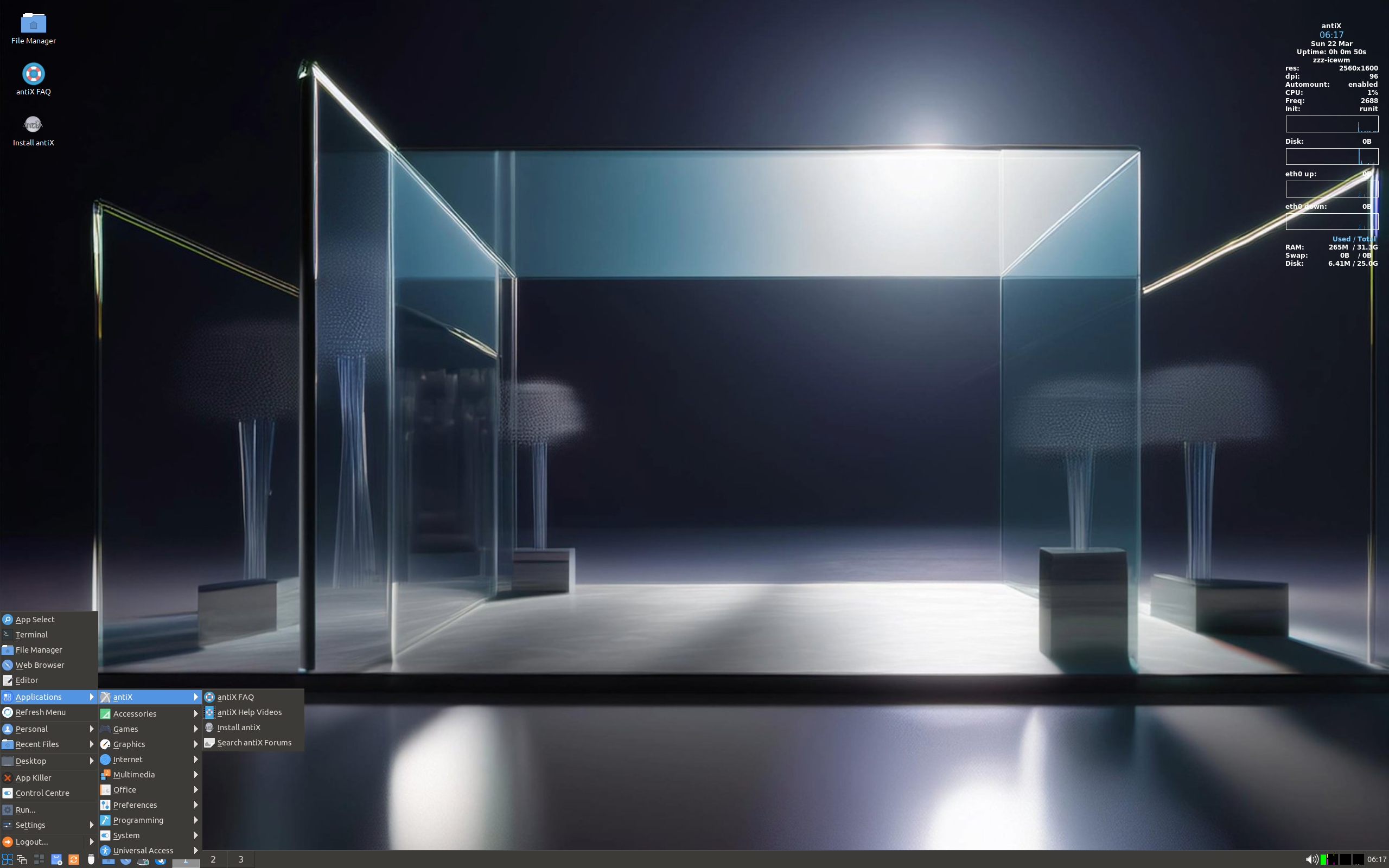
antiX does not ship GNOME or KDE. It ships IceWM as the default window manager, with Fluxbox and JWM available as alternatives — all three renowned for speed and tiny footprints. IceWM in particular gives antiX a familiar, taskbar-driven feel that newcomers adapt to quickly, without the resource appetite of a full desktop environment.
On top of those window managers sits what the project calls the “antiX Magic”: a set of in-house tools and scripts for system configuration, live-USB creation, persistence, and remastering that make the distribution far more approachable than its spartan looks suggest. Fluxbox fans who want a slightly fuller expression of the same idea will recognize the desktop from MX Linux’s Fluxbox edition — the sibling project’s lightweight sibling, you might say — but here the window manager is the main event, not the diet option.
Init Your Way: runit, dinit, s6, or SysV
Perhaps the most distinctive thing about antiX is what it does not ship: systemd. The DistroWatch listing offers a genuine menu of init systems — runit, dinit, s6, s6-66, and classic SysV — and leaves the choice to the user. This puts antiX in the same philosophical camp as our Artix review subject, which also defaults to runit and keeps systemd out of the picture.
For users who simply want their system to boot fast on old hardware, the init debate is mostly invisible plumbing. But for tinkerers, servers-on-a-shoestring, and anyone who prefers the Unix tradition of small, replaceable parts, antiX’s systemd-free design is a feature in its own right — and a deliberate one, given how much of the lightweight-Linux world has quietly standardized on systemd.
A Live System That Rescues and Persists
antiX began life as a live CD distribution, and that heritage is still front and center. DistroWatch lists it under Live Medium and Load To RAM, which means you can boot the ISO from a USB stick, try the whole system without touching your hard drive, and — with enough memory — run everything from RAM for a snappy test drive. It also works as a fast-booting rescue CD for machines that will not boot on their own.
The live USB story goes further than most: antiX supports persistent file storage, so a USB stick can become a portable, personalized Linux system that remembers your files and settings between boots. When you are ready to commit, the antix-installer handles the installation. Few distributions make the journey from “let me test this on grandma’s old laptop” to “this old laptop runs Linux now” as short or as convincing.
Get An Easy Personal Loan At Sofi
Who Should Try antiX?
- Owners of aging hardware who want a modern, supported Linux on machines with as little as 256 MB of RAM.
- Debian admirers who love Debian Stable’s reliability but want it in a much lighter package — see our Debian review for the full-fat original.
- Systemd skeptics who prefer runit, SysV, dinit, or s6 — in the same tradition as our Artix review.
- Live-USB tinkerers who want a portable system with persistence, a rescue disk, or a run-from-RAM test drive.
- Rolling-curious conservatives — the semi-rolling and rolling characteristics keep things fresh without abandoning the Debian Stable base, unlike pure rolling releases such as Manjaro.
- Minimalists who prefer IceWM, Fluxbox, or JWM to full desktop environments and like their system to stay out of the way.
Final Thoughts
antiX 26 is a distribution with a clear mission and no interest in competing with the mainstream. It is free, built on Debian Stable, installable from a live medium that fits on modest USB sticks, and it runs on hardware that most distributions gave up on years ago. With its choice of window managers, its systemd-free init menu, its “antiX Magic” tooling, and an 8.4/10 visitor rating at #18 on DistroWatch, it occupies a niche that is small but fiercely loyal.
Bottom line: if you have an old computer gathering dust — or simply believe an operating system should be lean, fast, and yours to shape — antiX 26 deserves a USB stick and an afternoon. It is proof that “lightweight” and “fully functional” are not opposites, just a design decision most distributions stopped making.
Source: DistroWatch: antiX feature and package table. Information cited in this post reflects the DistroWatch listing for antiX release 26, released March 21, 2026.