elementary Review
elementary OS 8.1 “Circe”: The macOS-Inspired Desktop That Sweats Every Detail
elementary OS is a free, Ubuntu (LTS)-based desktop Linux distribution from the USA that ships its own hand-built Pantheon desktop environment — and it treats interface design with the seriousness most distributions reserve for the kernel. Version 8.1 “Circe”, released February 27, 2026, is the latest of a line that has stayed focused on one idea: a Linux desktop that feels like a finished product.
Most Linux distributions assemble a desktop from off-the-shelf parts. elementary OS takes the harder road: it builds its own desktop environment, Pantheon, and its own suite of apps — Photos, Music, Videos, Calendar, Terminal, and Files — all designed to a single, coherent visual language. According to its DistroWatch listing, elementary OS is an Ubuntu-based desktop distribution filed under the “Beginners”, “Desktop”, and “Live Medium” categories, and currently sits at #19 on DistroWatch with 547 hits per day.
The appeal is aesthetic as much as technical. If you have ever wished Linux could feel as considered as a certain fruit-logo operating system, elementary OS is the closest anyone has come — deliberately. For a different flavor of the same Ubuntu-based beginner-friendly formula, our Linux Mint review covers another polished option built on that foundation.
At a Glance
| Base | Debian, Ubuntu (LTS) |
| Current listed release | 8.1.1 “Circe”, released February 27, 2026 |
| Previous releases | 8.0.1 (March 19, 2025), 8.0 (November 26, 2024), 7.1 “Horus” (October 3, 2023) |
| Desktop | Pantheon (built in-house) |
| Architecture | x86_64 |
| DistroWatch categories | Beginners, Desktop, Live Medium |
| Origin | USA |
| ISO image size | 3,100–3,200 MB |
| Price | Free |
| Status | Active |
Feature details and version information are based on the DistroWatch elementary OS listing, current as of September 2026.
Pantheon: A Desktop Built, Not Assembled
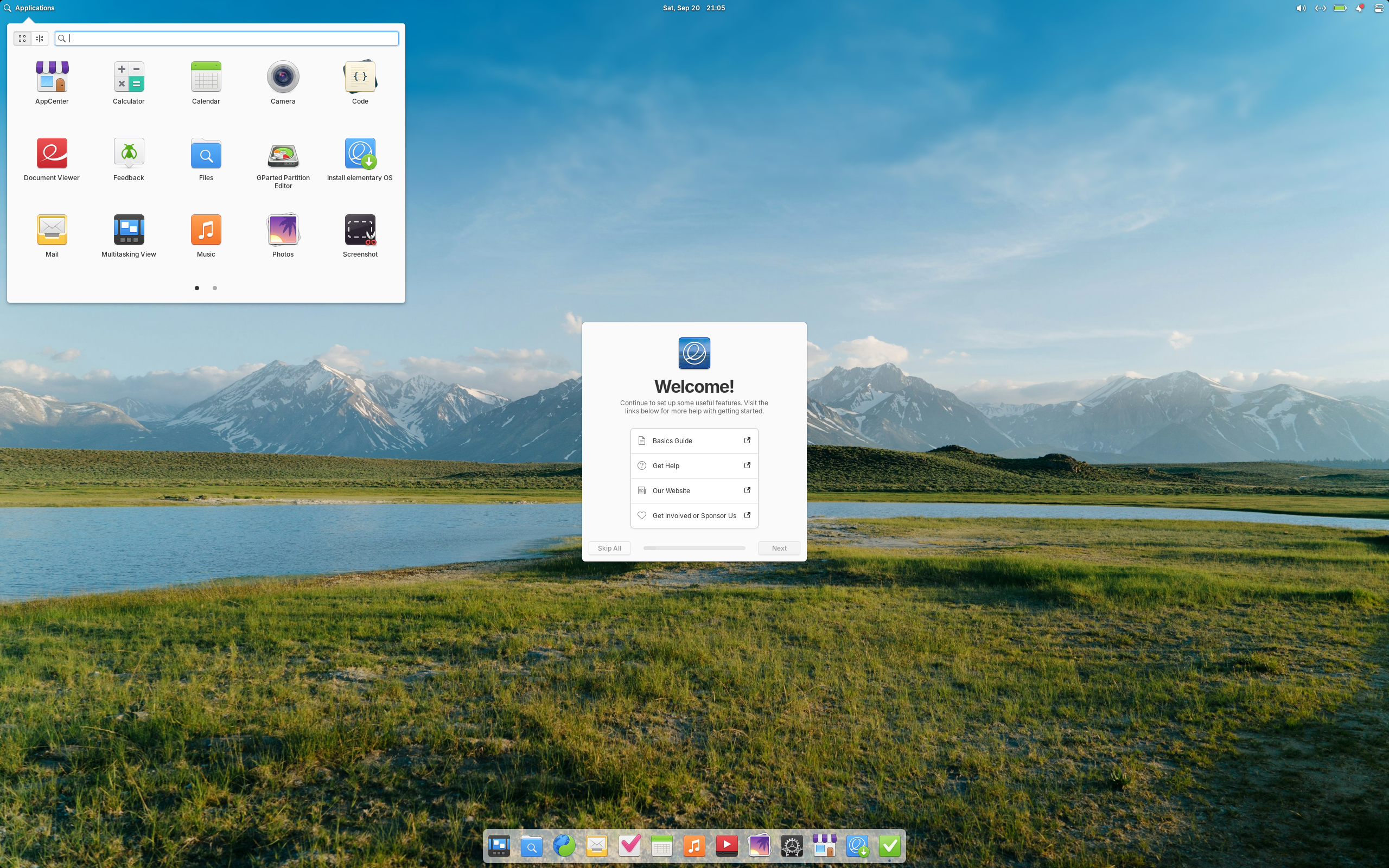
Pantheon is the reason to care about elementary OS. It is a custom desktop environment written specifically for this distribution, and everything about it — the top bar, the dock, the application launcher, the window controls — is designed to look like it belongs together, because it does. There are no mismatched themes, no widgets fighting each other, no sense that three different decades of design collided on your screen.
That coherence extends to the default app set. DistroWatch notes that elementary OS ships custom apps including Photos, Music, Videos, Calendar, Terminal, and Files, plus the Epiphany web browser and a fork of the Geary mail client. Every one of them follows the same design guidelines, which means the whole system reads as one piece of software rather than a collection of parts.
Building your own desktop is a bold strategy — our Pop!_OS review covers another distribution that designs its own interface rather than borrowing one — and it is the single biggest differentiator elementary OS has.
Designed Like a Product, Not a Project
Open-source software is famous for powerful tools with indifferent presentation. elementary OS flips that script: it treats design as a first-class feature. The project has long enforced strict human-interface guidelines, and the result is a desktop where the spacing, the typography, and the little animations all feel deliberate. It is the Linux distribution most likely to make a visiting macOS user nod in recognition.
This design-first philosophy shows up in the details DistroWatch records: a dedicated elementary Installer (rather than stock Ubiquity, which elementary used in older releases), multilingual support, and a Live Medium ISO that lets you try the whole experience before committing. The ISO is hefty at 3,100–3,200 MB — the price of shipping a complete, polished system — but it runs live, so you can judge the design for yourself before installing.
If that level of polish matters to you, our Zorin review looks at another Ubuntu-based distribution that takes first impressions seriously, aimed squarely at newcomers.
Ubuntu LTS Underneath, Modern Plumbing on Top
For all its design focus, elementary OS is built on utterly conventional foundations. DistroWatch lists it as based on Debian and Ubuntu (LTS), with a fixed release model — meaning major versions arrive as discrete releases rather than a rolling stream. Version 8.1.1 runs on Linux kernel 6.17 with systemd, supports Btrfs, ext4, JFS, ReiserFS, and XFS filesystems, and is available for x86_64 systems only. If you want to understand what that Debian/Ubuntu heritage brings to the table, start with our Debian review.
The package story is a pragmatic blend: deb packages managed by apt for the system, plus Flatpak (version 1.14.6 shipped) for sandboxed applications. That combination means the core system stays stable on its LTS base while users can still install current applications without wrestling with PPAs. The underlying software is genuinely current for a fixed-release distribution — GTK 4.14.5, Python 3.12.3, apt 2.8.3 — so you are not sacrificing modernity for polish.
Who Should Try elementary OS?
elementary OS is a statement distribution: it believes how software feels matters as much as what it does. It fits best for:
- Design-conscious users — if you judge software partly by its interface, this is the Linux desktop that takes your side. No other distribution is this visually coherent out of the box.
- macOS users looking to switch — the dock, the top bar, and the general visual language will feel immediately familiar, and the learning curve is among the gentlest in Linux.
- Linux newcomers who want a system that works and looks finished on day one, without a week of theme-hunting and forum-diving. DistroWatch’s “Beginners” category is well earned.
- Minimalists — the default app set is deliberately small and curated. If you prefer a system that ships less and does more, Pantheon’s restraint is a feature.
- Ubuntu fans who want something different — the LTS base brings familiar reliability, but the experience on top is nothing like stock Ubuntu.
It is less suited to tinkerers who want to reshape every corner of their desktop — Pantheon is opinionated by design — and to users who need 32-bit or ARM support, since elementary OS ships for x86_64 only.
Final Thoughts
elementary OS 8.1 “Circe” is what it has always been: a free, actively developed, Ubuntu (LTS)-based distribution from the USA with a hand-built Pantheon desktop, ranked #19 on DistroWatch with 547 hits per day. It does not try to be everything to everyone. It tries to be the most considered desktop in Linux — and by most accounts, it succeeds.
The trade-offs are honest ones. You give up desktop-choice flexibility and 32-bit support; you get a system where every app, every dialog, and every animation feels like it was designed by the same team on the same afternoon. For users who believe that matters, nothing else in the Linux world quite matches it.
Bottom line: If you want a Linux desktop that feels designed rather than assembled — coherent, calm, and genuinely beautiful — elementary OS 8.1 deserves a live-USB test drive. The design speaks for itself within five minutes of the live session.
Source: DistroWatch elementary OS feature table. Information cited in this post reflects the DistroWatch listing for elementary OS, current as of September 2026, including version 8.1.1 “Circe” (released February 27, 2026).