openKylin Review
openKylin 3.0-20260905: China’s Homegrown Debian Desktop Steps Up
Few distributions wear their national identity as openly as openKylin. DistroWatch lists it as a Debian-based, China-origin distribution with an Active status in the Desktop and Live Medium categories — and the top of the table tells you exactly what you’re getting: the Kylin and UKUI desktop environments, with both Wayland and X11 sessions available out of the box. DistroWatch’s description frames it as a proving ground for custom utilities that help users manage the operating system, and that experimental streak is half the appeal.
The latest version tracked in DistroWatch’s comparison table is 3.0-20260905, released September 7, 2026, following 2.0-SP2-20260407 (April 10, 2026). It is a free, fixed-release system shipping a roughly 7.7 GB ISO for x86_64 hardware, with Firefox as the default browser, apt package management over the deb format, the Kylin Installer, and systemd. It ranks #104 in DistroWatch’s popularity chart (136 hits per day; #69 over the last three months, and a striking #27 over the last four weeks at 369 hits per day), and visitors rate it 7.6 out of 10 across 7 reviews.
openKylin is the kind of distribution you try because you’re curious — and stay with because the curiosity pays off. If the Debian foundation is what draws you, our Debian review covers the bedrock everything here is built on; for another Debian-based desktop with a very different personality, see our MX Linux review.
openKylin at a Glance
| Latest release | 3.0-20260905 (released September 7, 2026, per DistroWatch) |
| Base | Debian |
| Origin / Status | China / Active |
| Category | Desktop, Live Medium |
| Release model | Fixed |
| Default desktop | Kylin, UKUI (Wayland and X11 sessions out of the box) |
| Package management | apt (deb) plus a custom package format with a software centre |
| Installer | Kylin Installer |
| Init system | systemd |
| Architecture | x86_64 (3.0); aarch64, riscv, loongarch also supported by the project |
| Image size | 7,700–7,800 MB |
| Default browser | Firefox |
| Office suite | WPS Office |
| Filesystems | Btrfs, ext4, XFS |
| Cost | Free |
| DistroWatch popularity | #104 (~136 hits per day; #69 over the last 3 months, #27 over the last 4 weeks) |
| Visitor rating | 7.6/10 from 7 reviews |
Two Desktops, One Identity: Kylin and UKUI
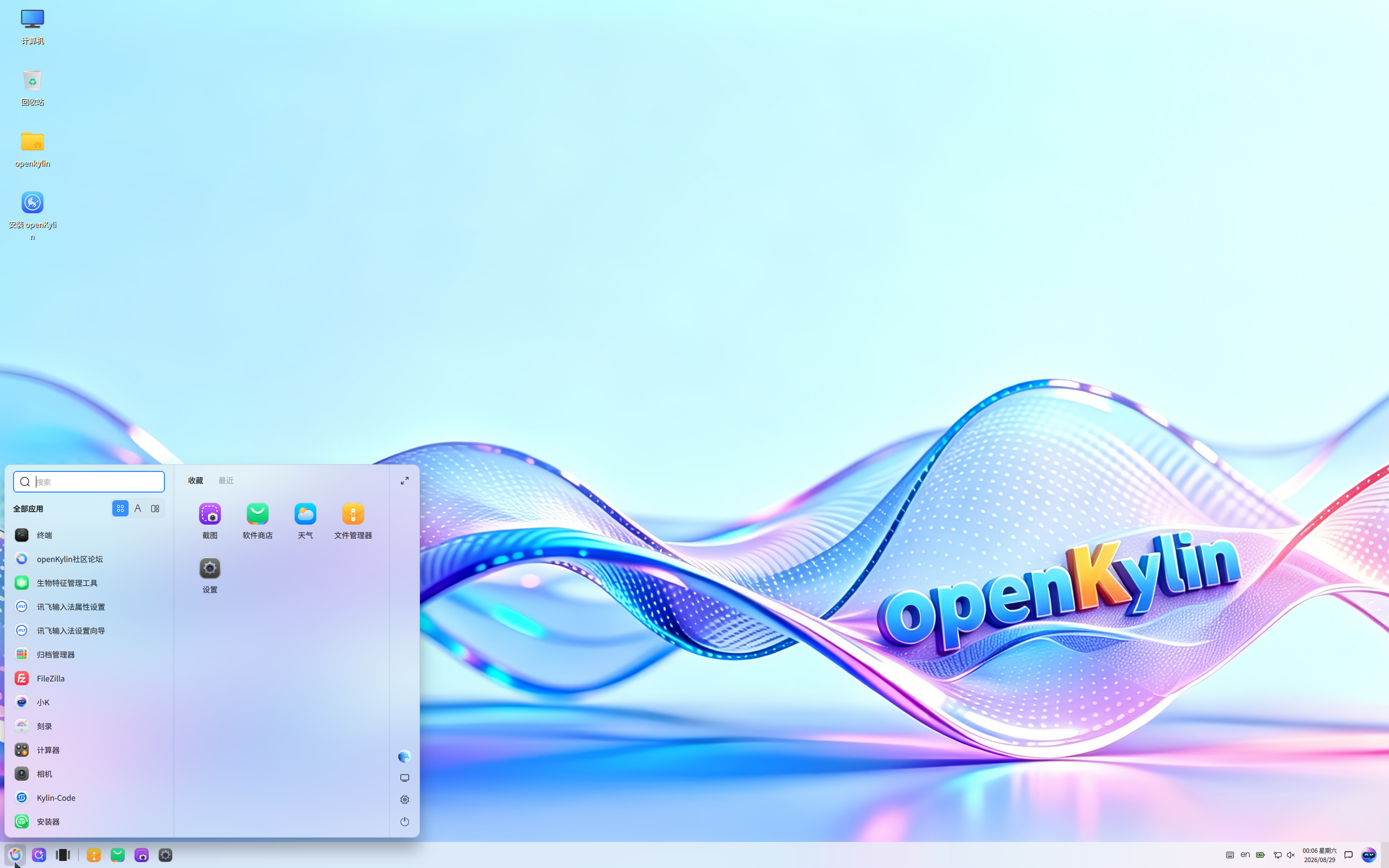
The headline feature of openKylin is right there in the table’s Default Desktop row: Kylin and UKUI, both offered with Wayland and X11 sessions from first boot. UKUI is the star — a Qt-based desktop developed in China with a clean, modern look that one DistroWatch reviewer called “exceptionally well-polished and beautiful,” a genuine change of pace after years of GNOME and KDE. The 3.0 release moves to UKUI 4.24, according to community reviewers, and the default screenshot on DistroWatch shows it off: a light, flowing wallpaper, a tidy launcher, and a taskbar that will feel instantly familiar to anyone arriving from Windows.
This is not a distribution that reskins someone else’s desktop and calls it a day. DistroWatch notes that openKylin serves as a proving ground for custom utilities that assist in managing the system — the project builds its own tooling rather than just theming stock components. That gives the whole experience a coherent, designed feel that most small Debian derivatives never achieve.
Free Credit Score Monitoring At Sofi
A Debian Base With Its Own Package Twist
Underneath the custom desktops sits a familiar foundation: openKylin is a member of the Debian family, and it uses APT with the deb package format, so the entire Debian software universe is within reach. But it doesn’t stop there — DistroWatch notes a custom package format combined with a software centre, giving users a curated graphical route to applications alongside the traditional apt workflow.
That dual approach puts openKylin in good company among Debian’s offspring. antiX is another Debian-based option worth comparing — it leans minimal and old-hardware-friendly, while openKylin goes the opposite direction with a full, polished, modern desktop. Same family, opposite philosophies, and the choice between them says a lot about what you want from a Debian base.
3.0: The Big Modernization Jump
Comparing the two columns in DistroWatch’s table, the 3.0 line is a serious generational leap over 2.0-SP2. The kernel moves from 6.6 to 7.0, Firefox from 146.0.1 onward in newer builds, GCC from 12.2.0 to 15.2.0, and Python to 3.12.2 — this is a modern software stack, not a stale LTS snapshot. The 3.0 ISO is a hefty 7.7 GB, reflecting just how much desktop, tooling, and language support ships out of the box, and the 3.0 column targets x86_64 while the project as a whole supports aarch64, riscv, and loongarch as well.
Refinance Your Student Loan At Sofi
Early community reviews of the 3.0 line are encouraging: a September 2026 reviewer running 3.0-20260905 as a daily driver rated it 9/10, praising the clean, intuitive interface and responsive feel. The release cadence is fixed rather than rolling, so what you install is a polished point release — install it, use it, and don’t think about your package manager until the next version lands.
The Proving Ground for Chinese Desktop Linux
openKylin’s origin story matters. As a China-origin project backed by a real community and corporate ecosystem, it is one of the few distributions genuinely attempting to build a mainstream desktop Linux identity outside the Western mainstream — complete with its own installer (the Kylin Installer), its own software centre, and WPS Office preinstalled instead of LibreOffice, a choice that tells you exactly which office-document world its users live in.
The numbers suggest the wider world is starting to notice: DistroWatch’s popularity trend shows openKylin climbing from #124 over twelve months to #27 over the last four weeks at 369 hits per day — a sharp recent surge of curiosity. With systemd under the hood, Btrfs/ext4/XFS filesystem support, and a free ISO, there’s nothing exotic about installing it; the exotic part is what you find once you log in.
Who Should Try openKylin?
- The desktop-curious — if you’ve lived in GNOME or KDE for years, UKUI is a genuinely fresh, well-polished alternative worth an afternoon in a VM.
- Debian fans wanting something different — all the apt/deb familiarity, wrapped in a desktop and toolset you won’t find anywhere else.
- Wayland testers — Wayland and X11 sessions ship side by side out of the box, making comparison easy.
- Fans of Chinese tech ecosystems — WPS Office, the Kylin tooling, and the openKylin community make this the most complete window into China’s desktop Linux scene.
- Reviewers and distro-hoppers — the 3.0 line’s modern kernel and software stack make this the right moment to look; the 2.0 line feels a generation behind.
- Anyone bored with reskins — the custom utilities and proving-ground philosophy mean this is a project building things, not just theming them.
Final Thoughts
openKylin 3.0-20260905 is the rare distribution that is both deeply familiar and genuinely foreign: Debian underneath, with apt, systemd, and Firefox doing exactly what you’d expect — and a Chinese-designed desktop, installer, and software centre on top that you won’t find anywhere else. It’s free, actively developed, climbing DistroWatch’s charts fast (#27 over the last four weeks), and rated a solid 7.6/10 by early reviewers. If you like the idea of a polished, user-friendly Debian-family desktop but want something far off the beaten path, this deserves a spot on your test-drive list — right next to our Linux Mint review, the Debian family’s mainstream champion, for the full contrast.
For release details, package versions, and the full version history, see the openKylin page at DistroWatch (comparison table last updated September 7, 2026).