Bluestar Review
Bluestar Linux 7.0.11: Arch’s Bleeding Edge, Pre-Assembled for the Desktop
Bluestar Linux is a free, Arch-based desktop distribution from Germany that ships a full KDE Plasma desktop with a generous default software selection on a live DVD. Its 7.0.11 release, current as of June 2026, delivers Arch’s rolling packages — kernel 7.0.11 and Plasma 6.6.5 — through the friendly Calamares installer instead of Arch’s manual setup.
Arch Linux has a reputation problem: it is fast, current, and endlessly flexible — but installing and configuring it is a weekend project. Bluestar exists to erase that tradeoff. According to its DistroWatch listing, Bluestar Linux is a GNU/Linux distribution based on Arch Linux that “features up to date packages, a full range of desktop and multimedia software in the default installation and a live desktop DVD.” In other words, it is Arch’s software library with the assembly work already done. If you want to compare this approach against other Arch-family options, our CachyOS review covers a performance-tuned take on the same base.
The project takes a kitchen-sink approach to the default install: a full KDE Plasma desktop, both Chromium and Firefox, LibreOffice, VLC, Thunderbird — the ISO weighs in at a hefty 6.2 to 6.3 GB. This is not a minimal net-install; it is a complete workstation image you boot live and install with Calamares. It currently ranks #25 on DistroWatch with 413 hits per day and carries a 5.2/10 average visitor rating from 29 reviews, a mixed score that hints at a distribution with a loyal niche and some rough edges.
At a Glance
| Base | Arch Linux |
| Current listed release | 7.0.11, released June 9, 2026 |
| Desktop | KDE Plasma (Plasma 6.6.5) |
| Kernel | 7.0.11 |
| Installer | Calamares |
| Package management | pacman (pkg), plus Flatpak support |
| Release model | Rolling |
| Architectures | x86_64 |
| Init system | systemd |
| Journaled filesystems | Btrfs, ext4, XFS |
| Default browsers | Chromium and Firefox |
| Office suite | LibreOffice |
| ISO image size | 6,200–6,300 MB |
| DistroWatch categories | Desktop, Live Medium |
| Origin | Germany |
| Price | Free |
| Status | Active |
Feature details and version information are based on the DistroWatch Bluestar Linux listing, current as of September 2026.
Everything Installed, Nothing Left to Fetch
The defining characteristic of Bluestar is its refusal to make you go get things after install. Most Arch-based distributions pride themselves on starting lean and letting you build up; Bluestar goes the opposite direction. The default installation ships a full range of desktop and multimedia software — LibreOffice 26.2.4, VLC 3.0.23, Thunderbird, GIMP 3.2.4, and two browsers — all present the moment the installer finishes.
That philosophy shows in the ISO size: over 6 GB for the latest release, up from around 2.4 GB in its earliest listed versions. This is a distribution that grew into its “full installation” identity over the years. If you prefer your Arch lean and curated, our EndeavourOS review covers the minimalist counterpoint — Bluestar is for people who would rather delete what they do not need than hunt down what they do.
The live DVD aspect matters too. Because the ISO is a full live medium, you can test the entire desktop — every default app — before committing to an install. For a rolling Arch system, where the live session is a genuine preview of the installed experience, that is a practical way to evaluate hardware compatibility.
Plasma, Polished the Bluestar Way
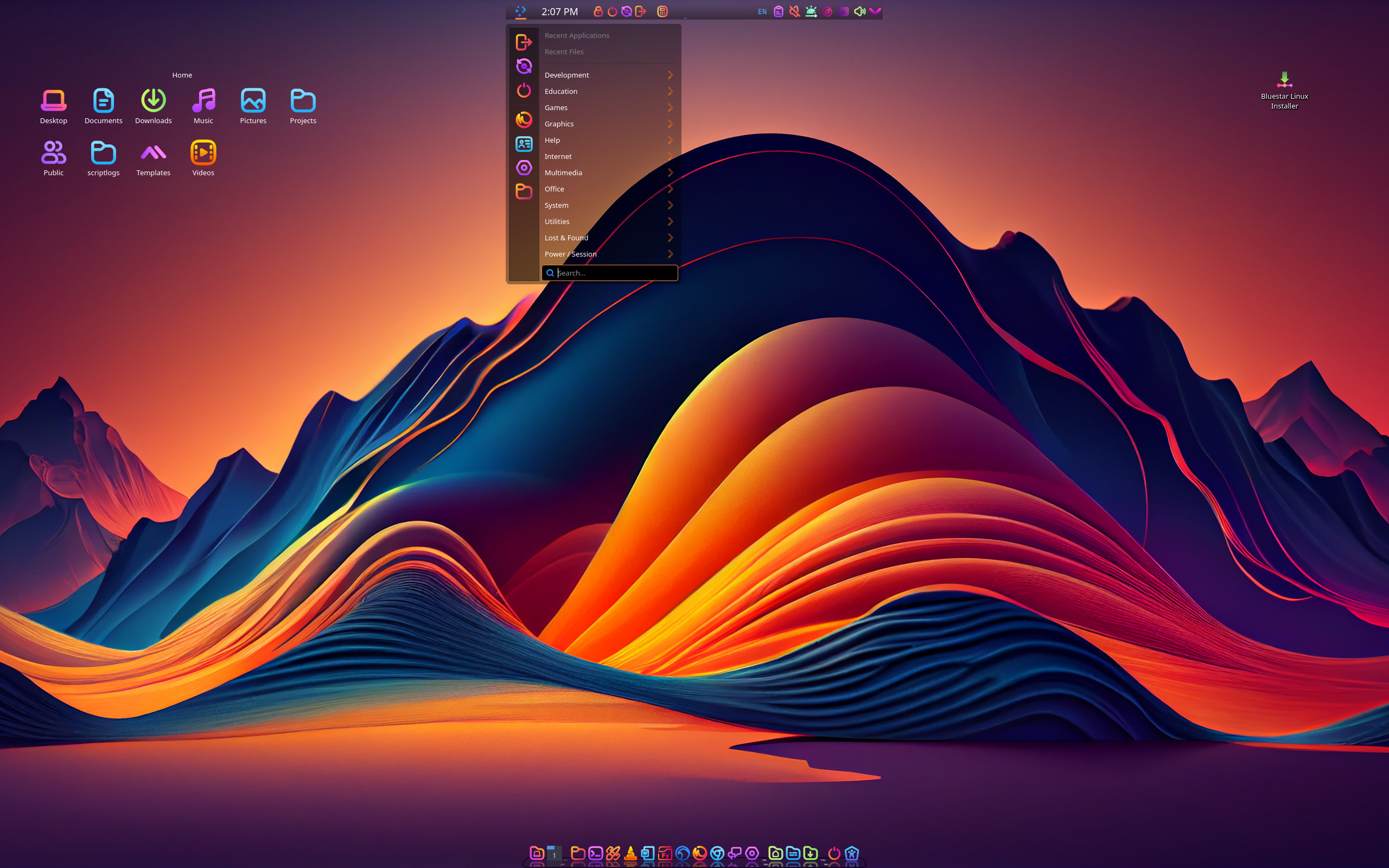
Bluestar commits fully to KDE Plasma — it is the only default desktop the project ships — and it themes it distinctively rather than leaving stock defaults. DistroWatch reader reviews consistently comment on the look and organization of the desktop, with several noting they loved how it appeared out of the box.
The Plasma version in 7.0.11 is 6.6.5, paired with Qt 6.11.1 and Wayland 1.25.0 support — current-generation KDE on a current kernel. One honest caveat from the DistroWatch reader reviews: the default session reportedly runs Plasma on X rather than Wayland, because the project’s dock setup requires X. If you are Plasma-first and want to see how another team presents the same desktop, our KDE neon review is worth a read — but Bluestar pairs its Plasma with Arch’s rolling software stream, a different beast entirely.
For gamers and multimedia users, the package table lists NVIDIA driver 610.43.02, Mesa 26.1.2, and ffmpeg 8.1.1 in the latest release — the kind of fresh multimedia stack that is exactly why people choose Arch-based rolling distributions for desktop and entertainment workloads.
Rolling Arch, Minus the Command Line
Underneath the polished surface, Bluestar is pure rolling Arch: pacman for packages, systemd for init, and a kernel that tracks the latest stable (7.0.11 as of the June 2026 refresh). The project has kept this cadence for a decade of listed releases, from the 4.x series in 2016 through 7.0.11 — an unusually long, consistent run for a small Arch derivative.
What changed along the way is telling. Flatpak support arrived with the 7.x series, giving users a sandboxed-app escape hatch alongside pacman’s AUR ecosystem. Filesystem options expanded from ext3/ext4 to include Btrfs and XFS. Multilingual support is a yes across the board. The project evolved from a modest Arch remix into a genuinely full-featured desktop system.
The Calamares installer is the key to the whole proposition: graphical, guided, and forgiving — the same installer family that made Manjaro the on-ramp for Arch-curious users years ago. Bluestar applies that same thinking with a heavier, more complete default payload.
Who Should Try Bluestar?
Bluestar is for the user who wants Arch’s freshness without Arch’s homework. It fits best for:
- Arch-curious desktop users who want rolling-release software — the newest kernels, the newest Plasma — but would rather click through Calamares than configure everything by hand. Fans of the Arch family may also enjoy our Garuda review for a flashier take on the same idea.
- KDE Plasma enthusiasts who want a fully themed, ready-to-use Plasma desktop with a big default application set on day one.
- Multimedia and entertainment PCs — the full default software range, live DVD testing, and fresh graphics stacks make it a natural fit for a living-room or creative workstation.
- Distro hoppers who like complete installs — if your instinct after installing is to immediately add LibreOffice, VLC, and a second browser anyway, Bluestar just skips that step.
- Live-medium testers who evaluate distributions by booting them: the 6 GB ISO is a complete system to kick the tires on real hardware.
On the other hand, minimalists should look elsewhere — a 6.2 GB ISO is the opposite of lean. And the 5.2/10 visitor rating suggests checking recent DistroWatch reader reviews before installing: some users report hardware-specific quirks (boot issues on certain machines, touchpad and Wi-Fi complaints on laptops) that are worth knowing about in advance.
Final Thoughts
Bluestar Linux is a free, actively maintained, Arch-based desktop distribution from Germany that has been quietly doing its thing for a decade: KDE Plasma, a full application set, a live DVD, and a graphical installer, all on Arch’s rolling release model. Ranked #25 on DistroWatch, its 7.0.11 release (June 2026) ships kernel 7.0.11 and Plasma 6.6.5 through pacman with Flatpak support.
It is not the most famous Arch derivative, and the mixed visitor rating says it is not for everyone — but its proposition is clear and honest. If you want Arch’s software freshness in a complete, pre-assembled KDE desktop you can test live and install graphically, Bluestar delivers exactly that, no command line required.
Bottom line: Bluestar is Arch for people who would rather use their computer than build it. Boot the live DVD, and if the full Plasma desktop with everything pre-installed feels right, you already know your answer.
Source: DistroWatch Bluestar Linux feature table. Information cited in this post reflects the DistroWatch listing for Bluestar Linux, current as of September 2026, including release 7.0.11 (released June 9, 2026).